Tool 02

Clip Renamer Pro
Bring All Your Bin Files Under Your Rule.
Batch rename without the batch headache.
Live preview. One pass. Done.
Bring All Your Bin Files Under Your Rule.
Batch rename without the batch headache.
Live preview. One pass. Done.
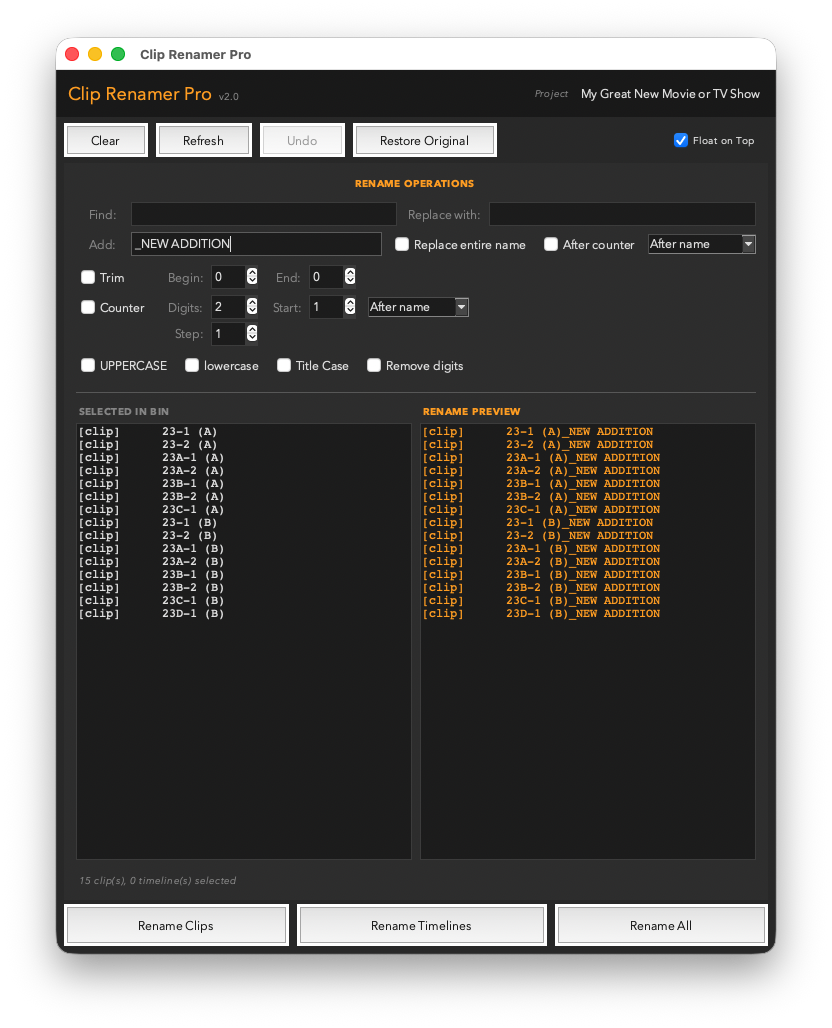
You've got 200 clips in a bin that all came off camera named something like A001C002_240318_R3D2. You need them to say something a human can read. Or you've got a mix of cases and want everything sentence-case. Or you're adding a project code prefix to every clip before you hand off the drive.
Clip Renamer Pro handles all of it — with a live before/after preview so you can see every change before it happens. Select your clips in the Media Pool, configure the transform, check the preview, and hit Apply. Nothing is permanent until you say so. And if you change your mind, one click restores every original name.
010, 020, 030. Start:1, Step:1 → 01, 02, 03.ClipName_010_VFX, ClipName_020_VFX in one Apply.A single .py file. Drop it in your Resolve scripts folder and it appears under Workspace → Scripts → Utility.
Works with DaVinci Resolve 18+ — free version and Studio both fully supported.
Requires Python 3 — free from python.org/downloads. Prefer to get it through Resolve? The Resolve console (Workspace → Console) links to the same Python 3 installer when Python isn’t detected.
_v1, _v01 or -v003 to every name in one pass instead of typing it on each clip. Always appended last, after the counter — combine it with Find/Replace to strip a file extension and stamp the version in a single operation. Step now sits alongside Digits and Start, and the Counter’s Start is the first number rather than a multiplier. Marker Madness
 Track Command
 Reel Time Plus